Answers · guide reviewed 2026-09-16 · updated 2026-09-17
How do I choose a no-drill doorbell camera for an apartment?
A no-drill doorbell camera needs two things: a doorbell that can run without new power wiring and a mount confirmed to fit that exact model, door and surface. A removable door clamp or an approved adhesive mount may work, but a battery label alone is not enough. Check clearance, the camera view and building permission before ordering.
By the How Many Cameras editorial team · Manufacturer specifications and planning estimates; not hands-on product tests.

Pick the mounting method before the doorbell
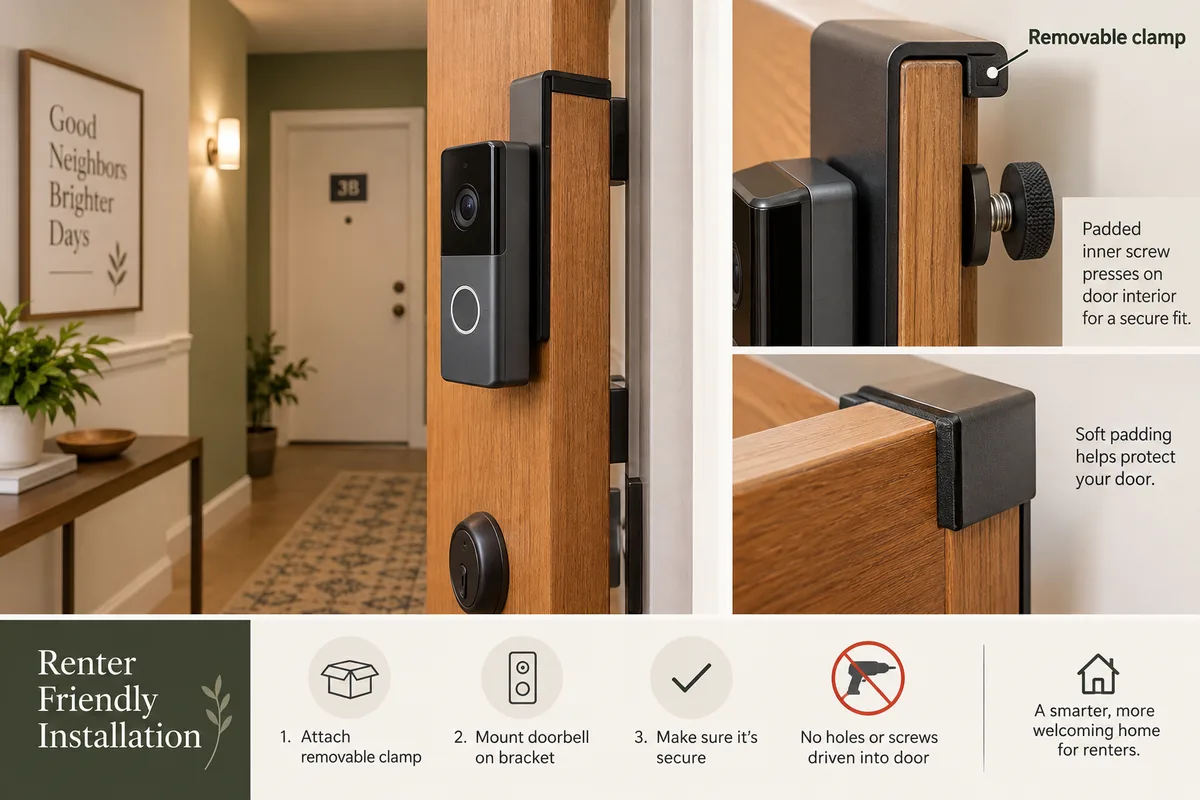
For a rented apartment, the constraint may be the door rather than the camera. A narrow frame, an outward-opening door, a close-fitting storm door or a rough wall can rule out an otherwise appealing mount. Photograph the door edge and frame, then check the mount seller's exact compatibility list.
| Method | What to verify | Do not assume |
|---|---|---|
| Door-edge clamp / hanger | Door thickness, opening direction, frame clearance, device fit and safe closing. | That “universal” covers your model or that the bracket will clear a second door. |
| Manufacturer-listed adhesive mount | Approved surface, exact doorbell generation, weather exposure and removal instructions. | That adhesive is allowed on every finish or surface. |
| An existing mounting point | Written permission, matching holes or hardware, and the doorbell's installation instructions. | That existing screws mean no modification is needed. |
A specific example: Ring's adhesive mount
Ring's No-Drill Mount listing names the doorbells it supports. It calls for a smooth, even surface, warns against rough materials and says not to mount on glass. That is a useful example of why “Ring doorbell” alone is not a precise compatibility check: the generation and accessory matter.
Do not apply that accessory's requirements to every adhesive or clamp product. Use the instructions for the item you will actually install, including how it can be removed without damaging the surface.
Battery doorbells to investigate
These catalog models include a battery-powered variant. The table is a power shortlist, not a list of verified no-drill bracket pairings. Check the model page, then confirm the mount separately. Availability and price vary between US and Canadian stores.
| Doorbell | Recording subscription in catalog | Mount status |
|---|---|---|
| Ring Battery Doorbell 2K (2nd Gen) | Paid plan listed for recording | Verify the exact bracket and door fit |
| Ring Battery Doorbell 2K Plus (2nd Gen) | Paid plan listed for recording | Verify the exact bracket and door fit |
| eufy Video Doorbell E340 | Local recording option; check required storage | Verify the exact bracket and door fit |
| eufy Video Doorbell C31 | Local recording option; check required storage | Verify the exact bracket and door fit |
| Wyze Battery Video Doorbell | Local recording option; check required storage | Verify the exact bracket and door fit |
| Reolink Video Doorbell (2nd Gen) | Local recording option; check required storage | Verify the exact bracket and door fit |
| Reolink Video Doorbell (Battery) | Local recording option; check required storage | Verify the exact bracket and door fit |
| SwitchBot Smart Video Doorbell | Local recording option; check required storage | Verify the exact bracket and door fit |
| Arlo Video Doorbell 2K (2nd Gen) | Paid plan listed for recording | Verify the exact bracket and door fit |
| Google Nest Doorbell (battery) | Paid plan listed for recording | Verify the exact bracket and door fit |
| Aqara Smart Doorbell Camera Hub G410 | Local recording option; check required storage | Verify the exact bracket and door fit |
| TP-Link Tapo D210 Battery Doorbell | Local recording option; check required storage | Verify the exact bracket and door fit |
| TP-Link Tapo D225 Battery Doorbell | Local recording option; check required storage | Verify the exact bracket and door fit |
Measure the door and test the view
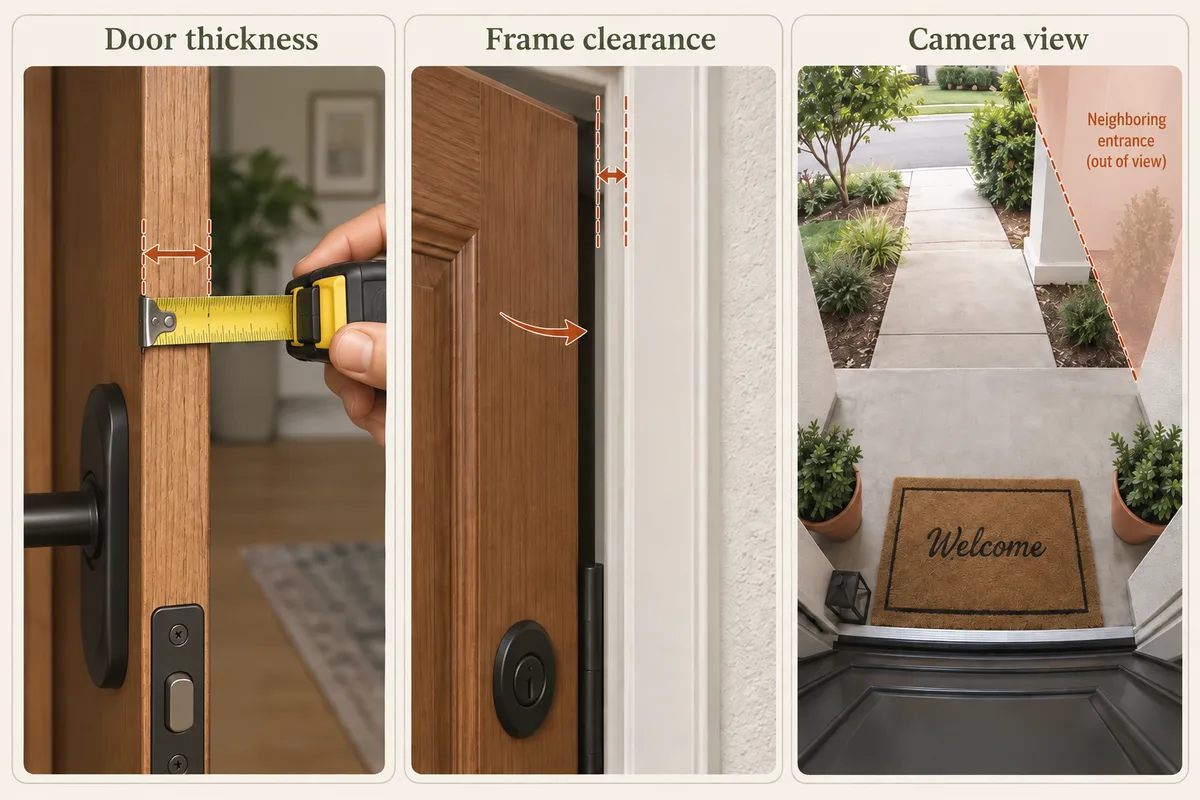
- Door fit: measure where the clamp will sit and compare with its published range. Check seals, trim and the latch.
- Opening and closing: confirm the bracket does not hit the frame or a screen door. Keep the entrance safe and fully usable.
- Camera view: check a visitor at the door and a package on the mat. A bracket that fits can still place the lens at a poor angle.
- Charging: find out whether you remove a battery or the whole doorbell, and whether the bracket allows that access.
- Connection and chime: check Wi-Fi at the closed door and what is required if you want an indoor chime rather than only phone alerts.
Keep recording costs separate from installation
No-drill installation does not determine recording fees. One battery doorbell may use local storage; another may require a paid service to replay saved clips. Include the card, hub or chime required by the exact configuration. Read the no-subscription recording guide before comparing prices.
If you also want a smart lock, confirm the existing door hardware and permission to change it. “Retrofit” does not establish that every lock fits or that your lease permits it. For Ring users, our lock compatibility guide separates supported integrations from devices that simply share Alexa.
Start from the front-door example
The no-drill planner preset selects the condo front entrance, battery power and no-drill mounting, then opens the result step. The balcony is left off so you can focus on the door. You can change the layout and add other areas if they apply.
The drawing is a starting point. It does not certify an accessory, building permission or the view of a particular camera. Keep those checks alongside the model list as you decide what to buy.
Installation fit and recording cost are separate choices. The subscription-free doorbell comparison explains where footage is saved and which modes require wiring; the power guide separates Wi-Fi from battery operation.
Related questions
Does battery powered mean no drilling?
No. Battery power removes the need for a power cable, but the camera still needs a suitable mount. Confirm the exact bracket, model, door dimensions and permitted installation method.
Can I attach an adhesive mount to glass or rough brick?
Check the mount's instructions. Ring's listed No-Drill Mount requires a smooth, even surface and says not to use glass; it also warns against brick, shingles and rough stucco. Other mounts may have different requirements.
Will any door clamp fit any video doorbell?
No. Check the doorbell model, door thickness, opening direction, frame gap and any screen or storm door. Test that the door closes and latches properly without forcing the bracket.
Can I install a camera in a shared hallway?
Check your lease, building rules and applicable local requirements before recording a common area. Get the relevant permission and avoid assuming a removable mount makes recording acceptable.
Will the preset include a no-drill bracket?
No. It keeps no-drill mounting selected and opens a front-door example. A model-specific bracket or clamp still needs checking and may need to be purchased separately.
MAKE IT FIT YOUR HOME
Choose your next step
Use the conditions from this guide as a starting point. Your current list stays in place while you compare.
CHOOSE DEVICES
One battery doorbell, no drilling
Compare battery doorbells and check an exact-model no-drill bracket separately.
Compare in My list → Plan positions firstPLAN THE POSITIONS
Apartment entrance
Start with a front-door-only apartment and no-drill mounting. Check permission and bracket fit.
Open prefilled planner →Choose a bundle or individual devices, then add them to My list for compatibility checks and store links. A selected quantity is not a guarantee of coverage.
Sources & checks
- Ring No-Drill Mount: exact supported models and surface restrictions
- Doorbell catalog: power variants, storage and manufacturer sources
- What a no-drill position in our template means
Guide checked 2026-09-16. Product prices and specifications have their own checked dates on each model page.