Answers · guide reviewed 2026-09-29
Which security cameras work without a subscription?
28 outdoor camera models in our catalog have both an explicit no-subscription recording entry and local storage. The price table shows 12 of them. A separate review of 12 US and 3 Canadian camera and doorbell configurations below checks recording conditions against official documentation. A free recording plan does not make the camera price a complete system cost: microSD cards, outdoor power adapters, hubs and installation may add expense. The Planner carries those conditions into a shared 3/5-year estimate and lets you compare two device selections.
By the How Many Cameras editorial team · Manufacturer specifications and planning estimates; not hands-on product tests.

Try a comparison you can adjust
The eufy SoloCam S340 includes local storage; the Tapo C120 needs a card and plug-in power. They solve different installation needs. Open both as alternatives, enter storage or installation budgets, and compare the current prices on the same time horizon. The example positions are a starting point, not a whole-home coverage recommendation.
Compare built-in storage with a camera-card setup
Reviewed recording configurations
12 exact US configurations, checked against official documentation (latest review: 2026-09-29). These are documentation reviews, not hardware tests. The Planner uses these same facts to show storage allowances, 3/5-year costs and what remains without a paid recording plan.
A local-storage label does not establish continuous recording, smart alerts, offline operation or cloud retention. “Not verified” means this review has not established that feature. Prices keep their own recorded offer dates.
eufy SoloCam S340 · solar · Built-in storage
- 8 GB built-in storage; HomeBase 3 features and shared-storage limits are outside this reviewed route.
- Solar charging and event frequency affect battery endurance.
| Without a paid plan | Status | Conditions & evidence |
|---|---|---|
| Local recording | Available | Local video is stored on the device without a recording subscription.Official source |
| Local playback | Not verified | This review does not establish this feature after a paid plan ends. |
| Continuous video | Unavailable | The model FAQ explicitly excludes 24/7 recording, including with HomeBase 3.Official source |
| Smart detection | Available | Human and vehicle detection run locally. Face recognition is a separate HomeBase 3 capability.Official source |
| Paid cloud video history | Not verified | This review does not establish this feature after a paid plan ends. |
Source sections: Local Storage; FAQ: local AI and 24/7 recording. Review: HowManyCameras editorial process — AI-assisted review of official documentation; no hardware testing.
eufy Video Doorbell E340 · battery · Built-in storage
- 8 GB on-device storage; retention varies with event length and frequency.
- Battery configuration; doorbell transformer and chime compatibility need a separate installation check.
| Without a paid plan | Status | Conditions & evidence |
|---|---|---|
| Local recording | Available | Local video is stored on the device without a recording subscription.Official source |
| Local playback | Not verified | This review does not establish this feature after a paid plan ends. |
| Continuous video | Not verified | This review does not establish this feature after a paid plan ends. |
| Smart detection | Not verified | This review does not establish this feature after a paid plan ends. |
| Paid cloud video history | Not verified | This review does not establish this feature after a paid plan ends. |
Source sections: Product features; storage specification and retention footnote. Review: HowManyCameras editorial process — AI-assisted review of official documentation; no hardware testing.
TP-Link Tapo C120 · plug in · Camera microSD recording
- US product documentation; verify the hardware revision at purchase.
- microSD card up to 512 GB, purchased separately; use the camera card slot in this configuration.
| Without a paid plan | Status | Conditions & evidence |
|---|---|---|
| Local recording | Conditional | Local video does not require a recording subscription; install and configure a compatible microSD card.Official source |
| Local playback | Not verified | This review does not establish this feature after a paid plan ends. |
| Continuous video | Not verified | This review does not establish this feature after a paid plan ends. |
| Smart detection | Available | On-device smart detection is listed without a subscription. Detection categories differ by model.Official source |
| Paid cloud video history | Unavailable | Tapo Care cloud video history requires the paid service; local storage is separate.Official source |
Source sections: Local/cloud storage; free AI detection; recording-mode footnotes. Review: HowManyCameras editorial process — AI-assisted review of official documentation; no hardware testing.
TP-Link Tapo C425 KIT · solar kit · Camera microSD recording
- US product documentation; verify the hardware revision at purchase.
- microSD card up to 512 GB, purchased separately; use the camera card slot in this configuration.
| Without a paid plan | Status | Conditions & evidence |
|---|---|---|
| Local recording | Conditional | Local video does not require a recording subscription; install and configure a compatible microSD card.Official source |
| Local playback | Not verified | This review does not establish this feature after a paid plan ends. |
| Continuous video | Not verified | This review does not establish this feature after a paid plan ends. |
| Smart detection | Available | On-device smart detection is listed without a subscription. Detection categories differ by model.Official source |
| Paid cloud video history | Unavailable | Tapo Care cloud video history requires the paid service; local storage is separate.Official source |
Source sections: Local/cloud storage; free AI detection; recording-mode footnotes. Review: HowManyCameras editorial process — AI-assisted review of official documentation; no hardware testing.
TP-Link Tapo C460 · battery · Camera microSD recording
- US product documentation; verify the hardware revision at purchase.
- microSD card up to 512 GB, purchased separately; use the camera card slot in this configuration.
| Without a paid plan | Status | Conditions & evidence |
|---|---|---|
| Local recording | Conditional | Local video does not require a recording subscription; install and configure a compatible microSD card.Official source |
| Local playback | Not verified | This review does not establish this feature after a paid plan ends. |
| Continuous video | Conditional | Continuous Capture uses interval images when no object is detected, then switches to standard recording on detection. It is not a full-frame continuous video timeline.Official source |
| Smart detection | Available | On-device smart detection is listed without a subscription. Detection categories differ by model.Official source |
| Paid cloud video history | Unavailable | Tapo Care cloud video history requires the paid service; local storage is separate.Official source |
Source sections: Local/cloud storage; free AI detection; recording-mode footnotes. Review: HowManyCameras editorial process — AI-assisted review of official documentation; no hardware testing.
TP-Link Tapo D225 Battery Doorbell · battery · Camera microSD recording
- US product documentation; verify the hardware revision at purchase.
- microSD card up to 512 GB, purchased separately; use the camera card slot in this configuration.
| Without a paid plan | Status | Conditions & evidence |
|---|---|---|
| Local recording | Conditional | Local video does not require a recording subscription; install and configure a compatible microSD card.Official source |
| Local playback | Not verified | This review does not establish this feature after a paid plan ends. |
| Continuous video | Conditional | 24/7 recording requires hardwired mode. The battery configuration here does not satisfy that condition.Official source |
| Smart detection | Available | On-device smart detection is listed without a subscription. Detection categories differ by model.Official source |
| Paid cloud video history | Unavailable | Tapo Care cloud video history requires the paid service; local storage is separate.Official source |
Source sections: Local/cloud storage; free AI detection; recording-mode footnotes. Review: HowManyCameras editorial process — AI-assisted review of official documentation; no hardware testing.
TP-Link Tapo D210 Battery Doorbell · battery · Camera microSD recording
- US product documentation; verify the hardware revision at purchase.
- microSD card up to 512 GB, purchased separately; use the camera card slot in this configuration.
| Without a paid plan | Status | Conditions & evidence |
|---|---|---|
| Local recording | Conditional | Local video does not require a recording subscription; install and configure a compatible microSD card.Official source |
| Local playback | Not verified | This review does not establish this feature after a paid plan ends. |
| Continuous video | Not verified | This review does not establish this feature after a paid plan ends. |
| Smart detection | Available | On-device smart detection is listed without a subscription. Detection categories differ by model.Official source |
| Paid cloud video history | Unavailable | Tapo Care cloud video history requires the paid service; local storage is separate.Official source |
Source sections: Local/cloud storage; free AI detection; recording-mode footnotes. Review: HowManyCameras editorial process — AI-assisted review of official documentation; no hardware testing.
Reolink Argus 4 Pro · with Solar Panel 2 · Camera microSD recording
- microSD up to 512 GB. This configuration uses camera storage, not a Home Hub.
- Select the camera + Solar Panel 2 kit at the retailer.
| Without a paid plan | Status | Conditions & evidence |
|---|---|---|
| Local recording | Conditional | Local video does not require a recording subscription; install and configure a compatible microSD card.Official source |
| Local playback | Not verified | This review does not establish this feature after a paid plan ends. |
| Continuous video | Not verified | This review does not establish this feature after a paid plan ends. |
| Smart detection | Not verified | This review does not establish this feature after a paid plan ends. |
| Paid cloud video history | Not verified | This review does not establish this feature after a paid plan ends. |
Source sections: Diverse Local Storage, No Monthly Fees; technical specifications. Review: HowManyCameras editorial process — AI-assisted review of official documentation; no hardware testing.
Reolink Altas PT Ultra · battery · Camera microSD recording
- microSD up to 512 GB; solar panel is optional in this battery configuration.
- Continuous recording endurance depends on settings, charge and available energy.
| Without a paid plan | Status | Conditions & evidence |
|---|---|---|
| Local recording | Conditional | Local video does not require a recording subscription; install and configure a compatible microSD card.Official source |
| Local playback | Not verified | This review does not establish this feature after a paid plan ends. |
| Continuous video | Conditional | Continuous recording is supported, but endurance depends on energy supply. The solar claim assumes Solar Panel 2 and the stated direct-sun conditions; that panel is not in this configuration.Official source |
| Smart detection | Not verified | This review does not establish this feature after a paid plan ends. |
| Paid cloud video history | Not verified | This review does not establish this feature after a paid plan ends. |
Source sections: Pre-recording; local storage; solar/recording footnote. Review: HowManyCameras editorial process — AI-assisted review of official documentation; no hardware testing.
Reolink E1 Outdoor Pro · plug in · Camera microSD recording
- microSD up to 512 GB; provide continuous plug-in power.
- NVR, FTP and Home Hub routes are outside this reviewed camera-card configuration.
| Without a paid plan | Status | Conditions & evidence |
|---|---|---|
| Local recording | Conditional | Local video does not require a recording subscription; install and configure a compatible microSD card.Official source |
| Local playback | Available | Saved local video can be replayed and filtered in the Reolink playback interface.Official source |
| Continuous video | Conditional | 24/7 recording is a listed recording mode; sufficient card storage and continuous power are required.Official source |
| Smart detection | Not verified | This review does not establish this feature after a paid plan ends. |
| Paid cloud video history | Not verified | This review does not establish this feature after a paid plan ends. |
Source sections: FAQ: subscription; Easy & Smart Playback; Recording Modes. Review: HowManyCameras editorial process — AI-assisted review of official documentation; no hardware testing.
Wyze Cam v4 · plug in · Camera microSD recording
- The page lists 256 GB in the recording/specification sections and 512 GB in an accessory FAQ. Confirm current card compatibility; no 512 GB guarantee is made here.
- Outdoor use requires the separately sold Wyze Outdoor Power Adapter.
- Additional purchase to budget: Outdoor Power Adapter for outdoor installation.
| Without a paid plan | Status | Conditions & evidence |
|---|---|---|
| Local recording | Conditional | Local video does not require a recording subscription; install and configure a compatible microSD card.Official source |
| Local playback | Not verified | This review does not establish this feature after a paid plan ends. |
| Continuous video | Conditional | 24/7 local recording requires a microSD card and continuous power. Outdoor power protection is an additional purchase.Official source |
| Smart detection | Unavailable | The reviewed page places advanced AI alerts in Cam Plus. Basic motion detection is a different feature.Official source |
| Paid cloud video history | Unavailable | Cloud video backup is provided through Cam Plus, separate from local card recording.Official source |
Source sections: 24/7 Recording with MicroSD Card; specifications; outdoor-adapter footnote; accessory FAQ. Review: HowManyCameras editorial process — AI-assisted review of official documentation; no hardware testing.
Wyze Battery Cam Pro · Battery · Camera microSD recording
- microSD up to 256 GB tested in the official guide.
- Without Cam Plus, Events Only local clips are about 12 seconds with a recording cooldown.
- For continuous recording Wyze recommends 5V 2A AC power; battery or solar-only power is not recommended.
| Without a paid plan | Status | Conditions & evidence |
|---|---|---|
| Local recording | Conditional | Card recording remains available. Without Cam Plus, Events Only clips are about 12 seconds with a cooldown; continuous mode has separate power requirements.Official source |
| Local playback | Conditional | Use SD Card Playback on the configured Wi-Fi network, or eject the card and read its MP4 files on a computer.Official source |
| Continuous video | Conditional | Continuous card recording needs adequate power. Wyze recommends a 5V 2A AC source and warns of rapid battery drain; it is not recommended on battery/solar alone.Official source |
| Smart detection | Unavailable | AI alerts are a Cam Plus feature on the reviewed page; basic motion-triggered events remain distinct.Official source |
| Paid cloud video history | Unavailable | Cam Plus cloud video storage is separate from microSD recording and needs the paid service.Official source |
Source sections: Using MicroSD Cards With Battery Cam: Continuous and Events Only Recording. Review: HowManyCameras editorial process — AI-assisted review of official documentation; no hardware testing.
Cost method and evidence limits · No-subscription buying guide
Canadian recording evidence
The Canadian C120, C460 and D210 documentation supports local microSD recording. C120 explicitly lists continuous card footage; C460's Continuous Capture uses interval images between detected events. The D210 page verifies free person detection. These claims do not establish Canadian hardware or subscription prices. Missing CAD offers stay unpriced in the Planner.
Reviewed recording configurations
3 exact CA configurations, checked against official documentation (latest review: 2026-09-29). These are documentation reviews, not hardware tests. The Planner uses these same facts to show storage allowances, 3/5-year costs and what remains without a paid recording plan.
A local-storage label does not establish continuous recording, smart alerts, offline operation or cloud retention. “Not verified” means this review has not established that feature. Prices keep their own recorded offer dates.
TP-Link Tapo C120 · plug in · Camera microSD recording
- Canadian product documentation; verify the hardware revision at purchase. Recording evidence does not establish a Canadian purchase price.
- microSD card up to 512 GB, purchased separately; use the camera card slot in this configuration.
| Without a paid plan | Status | Conditions & evidence |
|---|---|---|
| Local recording | Conditional | Local video does not require a recording subscription; install and configure a compatible microSD card.Official source |
| Local playback | Not verified | This review does not establish this feature after a paid plan ends. |
| Continuous video | Conditional | The Canadian page explicitly lists continuous footage on a separately purchased microSD card up to 512 GB. Requires plug-in power and recording settings.Official source |
| Smart detection | Available | On-device smart detection is listed without a subscription. Detection categories differ by model.Official source |
| Paid cloud video history | Unavailable | Tapo Care cloud video history requires the paid service; local storage is separate.Official source |
Source sections: Local/cloud storage; free AI detection; recording-mode footnotes. Review: HowManyCameras editorial process — AI-assisted review of official documentation; no hardware testing.
TP-Link Tapo C460 · battery · Camera microSD recording
- Canadian product documentation; verify the hardware revision at purchase. Recording evidence does not establish a Canadian purchase price.
- microSD card up to 512 GB, purchased separately; use the camera card slot in this configuration.
- Continuous Capture uses interval images between events; it is not full-frame continuous video. The solar panel is sold separately.
| Without a paid plan | Status | Conditions & evidence |
|---|---|---|
| Local recording | Conditional | Local video does not require a recording subscription; install and configure a compatible microSD card.Official source |
| Local playback | Not verified | This review does not establish this feature after a paid plan ends. |
| Continuous video | Conditional | Continuous Capture uses interval images when no object is detected, then switches to standard recording on detection. It is not a full-frame continuous video timeline.Official source |
| Smart detection | Available | On-device smart detection is listed without a subscription. Detection categories differ by model.Official source |
| Paid cloud video history | Unavailable | Tapo Care cloud video history requires the paid service; local storage is separate.Official source |
Source sections: Local/cloud storage; free AI detection; recording-mode footnotes. Review: HowManyCameras editorial process — AI-assisted review of official documentation; no hardware testing.
TP-Link Tapo D210 Battery Doorbell · battery · Camera microSD recording
- Canadian product documentation; verify the hardware revision at purchase. Recording evidence does not establish a Canadian purchase price.
- microSD card up to 512 GB, purchased separately; use the camera card slot in this configuration.
| Without a paid plan | Status | Conditions & evidence |
|---|---|---|
| Local recording | Conditional | Local video does not require a recording subscription; install and configure a compatible microSD card.Official source |
| Local playback | Not verified | This review does not establish this feature after a paid plan ends. |
| Continuous video | Not verified | This review does not establish this feature after a paid plan ends. |
| Smart detection | Available | Person detection is listed as free, with no additional fee or subscription. Other AI categories are not established by this review.Official source |
| Paid cloud video history | Unavailable | Tapo Care cloud video history requires the paid service; local storage is separate.Official source |
Source sections: Local/cloud storage; free AI detection; recording-mode footnotes. Review: HowManyCameras editorial process — AI-assisted review of official documentation; no hardware testing.
Cost method and evidence limits · No-subscription buying guide
What does adding cloud history cost for four cameras?
These examples keep the same four cameras and local card storage, then add paid cloud history. They isolate the service fee: hardware, cards, installation and tax are excluded. Prices were checked on 29 September 2026. Annual billing means paying a full year at a time, including at the start.
| 4-camera system · US | Pay monthly | Pay annually | 5 years of annual invoices |
|---|---|---|---|
| Wyze Cam v4 | Cam Unlimited: USD 9.99/month | Cam Unlimited: USD 99.99/year | USD 499.95 Compare local-only A with cloud-added B in Planner |
| Tapo C120 | Tapo Cloud Advanced: USD 11.99/month | Tapo Cloud Advanced: USD 119.99/year | USD 599.95 Compare local-only A with cloud-added B in Planner |
Wyze Cam Plus is priced per camera; Cam Unlimited covers the selected compatible cameras with one fee. At three cameras, monthly Cam Plus totals USD 8.97, still below Unlimited's USD 9.99. At four, Unlimited is cheaper. Both reviewed tiers list 14-day cloud event history. Tapo Cloud Advanced lists unlimited devices and up to 180-day history for one home location per TP-Link ID. These services have different retention and features; their fees are not a like-for-like quality ranking.
Only reviewed offers are compared. Tapo's base annual card does not clearly establish its per-device billing unit, so that offer is excluded; the annual Advanced estimate may exceed a cheaper option at checkout. The model does not infer 24/7 video or premium AI compatibility, combine separate providers into one subscription, convert USD to CAD, or include introductory discounts.
Sources: Wyze service plans, billing and compatibility FAQs; Tapo Care US plan cards and household scope. The Planner preserves the billing choice in saved links and checks device quantities again when the selection changes.
Recording and access during an outage
Internet loss, a disconnected router and loss of mains power are different failures. The matrix below covers 8 exact regional configurations. It separates official guidance from dependency inferences; it is not a hardware outage test or a battery-runtime promise.
Tapo C120 and the reviewed Reolink camera-card routes can retain local recording with internet down; local App playback also needs the home network. Wyze's cited offline procedure describes scheduled timelapse, so ordinary event or continuous footage remains unverified here. A subscription cannot by itself restore a missing network or power path.
Tapo C120 · plug-in · US
Regional Tapo FAQ explicitly lists Tapo C120. Camera-card route only.
- Complete setup and enable the intended microSD recording mode before the outage. Use a working compatible card; check the exact firmware and settings.
- These are documentation reviews and labelled dependency inferences, not outage tests. Power cycling, recovery timing, saved-clip corruption and deferred alert delivery are not established.
Internet down · Wi-Fi stays on
The camera and router stay powered and connected locally; the home internet connection is down. No cellular failover.
| Function | Status and conditions |
|---|---|
| New event / continuous footage | Conditional.Previously configured microSD recording can continue while the camera stays powered. This does not add a recording mode the model does not support.Official documentation.Official source |
| App playback on home network | Conditional.The phone and camera must remain on the same functioning home network. Previously configured microSD footage is available through local playback.Official documentation.Official source |
| Remote camera access | Unavailable.The camera has no working internet path in this scenario. Existing cloud clips are a separate service; their availability is not assessed.Official documentation.Official source |
| New phone push alerts | Unavailable.New camera events cannot deliver phone push alerts over the missing network path; delayed delivery after recovery is not established.Official documentation.Official source |
Wi-Fi/router down · camera powered
The camera stays powered, but has no local network connection. No direct-access or alternate network is assumed.
| Function | Status and conditions |
|---|---|
| New event / continuous footage | Conditional.Previously configured microSD recording can continue while the camera stays powered. This does not add a recording mode the model does not support.Official documentation.Official source |
| App playback on home network | Unavailable.No camera-to-phone network path remains. Removing a card for a computer is separate from app playback.Official documentation.Official source |
| Remote camera access | Unavailable.The camera has no working internet path in this scenario. Existing cloud clips are a separate service; their availability is not assessed.Official documentation.Official source |
| New phone push alerts | Unavailable.New camera events cannot deliver phone push alerts over the missing network path; delayed delivery after recovery is not established.Official documentation.Official source |
Household power out · no backup
Mains-powered cameras and the router lose power. Battery cameras have charge remaining. No UPS, generator or backup internet is assumed.
| Function | Status and conditions |
|---|---|
| New event / continuous footage | Unavailable.This mains-powered camera has no operating power under the stated no-backup scenario. Stored footage is not the same as new recording or active access.Dependency inference.Official source |
| App playback on home network | Unavailable.This mains-powered camera has no operating power under the stated no-backup scenario. Stored footage is not the same as new recording or active access.Dependency inference.Official source |
| Remote camera access | Unavailable.This mains-powered camera has no operating power under the stated no-backup scenario. Stored footage is not the same as new recording or active access.Dependency inference.Official source |
| New phone push alerts | Unavailable.This mains-powered camera has no operating power under the stated no-backup scenario. Stored footage is not the same as new recording or active access.Dependency inference.Official source |
Reviewed 2026-09-29. Sources: Installation Q10; Other Questions Q6 (without Internet); monitoring power requirement; Applies to list. Exact model power supply and local storage specification.
Tapo C425 KIT · solar-kit · US
Regional Tapo FAQ explicitly lists Tapo C425 KIT. Camera-card route only.
- Complete setup and enable the intended microSD recording mode before the outage. Use a working compatible card; check the exact firmware and settings.
- These are documentation reviews and labelled dependency inferences, not outage tests. Power cycling, recovery timing, saved-clip corruption and deferred alert delivery are not established.
- Remaining battery charge is assumed; no backup runtime or sustained solar output is promised. Recording mode remains model-specific, not automatically 24/7 video.
Internet down · Wi-Fi stays on
The camera and router stay powered and connected locally; the home internet connection is down. No cellular failover.
| Function | Status and conditions |
|---|---|
| New event / continuous footage | Conditional.Previously configured microSD recording can continue while the camera stays powered. This does not add a recording mode the model does not support.Official documentation.Official source |
| App playback on home network | Conditional.The phone and camera must remain on the same functioning home network. Previously configured microSD footage is available through local playback.Official documentation.Official source |
| Remote camera access | Unavailable.The camera has no working internet path in this scenario. Existing cloud clips are a separate service; their availability is not assessed.Official documentation.Official source |
| New phone push alerts | Unavailable.New camera events cannot deliver phone push alerts over the missing network path; delayed delivery after recovery is not established.Official documentation.Official source |
Wi-Fi/router down · camera powered
The camera stays powered, but has no local network connection. No direct-access or alternate network is assumed.
| Function | Status and conditions |
|---|---|
| New event / continuous footage | Conditional.Previously configured microSD recording can continue while the camera stays powered. This does not add a recording mode the model does not support.Official documentation.Official source |
| App playback on home network | Unavailable.No camera-to-phone network path remains. Removing a card for a computer is separate from app playback.Official documentation.Official source |
| Remote camera access | Unavailable.The camera has no working internet path in this scenario. Existing cloud clips are a separate service; their availability is not assessed.Official documentation.Official source |
| New phone push alerts | Unavailable.New camera events cannot deliver phone push alerts over the missing network path; delayed delivery after recovery is not established.Official documentation.Official source |
Household power out · no backup
Mains-powered cameras and the router lose power. Battery cameras have charge remaining. No UPS, generator or backup internet is assumed.
| Function | Status and conditions |
|---|---|
| New event / continuous footage | Conditional.Remaining battery power plus the documented no-network microSD route can preserve configured recording. Runtime and restart behavior are not verified.Dependency inference.Official sourceOfficial source |
| App playback on home network | Unavailable.No camera-to-phone network path remains. Removing a card for a computer is separate from app playback.Official documentation.Official source |
| Remote camera access | Unavailable.The camera has no working internet path in this scenario. Existing cloud clips are a separate service; their availability is not assessed.Official documentation.Official source |
| New phone push alerts | Unavailable.New camera events cannot deliver phone push alerts over the missing network path; delayed delivery after recovery is not established.Official documentation.Official source |
Reviewed 2026-09-29. Sources: Installation Q10; Other Questions Q6 (without Internet); monitoring power requirement; Applies to list. Exact model power supply and local storage specification.
Tapo C120 · plug-in · CA
Regional Tapo FAQ explicitly lists Tapo C120. Camera-card route only.
- Complete setup and enable the intended microSD recording mode before the outage. Use a working compatible card; check the exact firmware and settings.
- These are documentation reviews and labelled dependency inferences, not outage tests. Power cycling, recovery timing, saved-clip corruption and deferred alert delivery are not established.
Internet down · Wi-Fi stays on
The camera and router stay powered and connected locally; the home internet connection is down. No cellular failover.
| Function | Status and conditions |
|---|---|
| New event / continuous footage | Conditional.Previously configured microSD recording can continue while the camera stays powered. This does not add a recording mode the model does not support.Official documentation.Official source |
| App playback on home network | Conditional.The phone and camera must remain on the same functioning home network. Previously configured microSD footage is available through local playback.Official documentation.Official source |
| Remote camera access | Unavailable.The camera has no working internet path in this scenario. Existing cloud clips are a separate service; their availability is not assessed.Official documentation.Official source |
| New phone push alerts | Unavailable.New camera events cannot deliver phone push alerts over the missing network path; delayed delivery after recovery is not established.Official documentation.Official source |
Wi-Fi/router down · camera powered
The camera stays powered, but has no local network connection. No direct-access or alternate network is assumed.
| Function | Status and conditions |
|---|---|
| New event / continuous footage | Conditional.Previously configured microSD recording can continue while the camera stays powered. This does not add a recording mode the model does not support.Official documentation.Official source |
| App playback on home network | Unavailable.No camera-to-phone network path remains. Removing a card for a computer is separate from app playback.Official documentation.Official source |
| Remote camera access | Unavailable.The camera has no working internet path in this scenario. Existing cloud clips are a separate service; their availability is not assessed.Official documentation.Official source |
| New phone push alerts | Unavailable.New camera events cannot deliver phone push alerts over the missing network path; delayed delivery after recovery is not established.Official documentation.Official source |
Household power out · no backup
Mains-powered cameras and the router lose power. Battery cameras have charge remaining. No UPS, generator or backup internet is assumed.
| Function | Status and conditions |
|---|---|
| New event / continuous footage | Unavailable.This mains-powered camera has no operating power under the stated no-backup scenario. Stored footage is not the same as new recording or active access.Dependency inference.Official source |
| App playback on home network | Unavailable.This mains-powered camera has no operating power under the stated no-backup scenario. Stored footage is not the same as new recording or active access.Dependency inference.Official source |
| Remote camera access | Unavailable.This mains-powered camera has no operating power under the stated no-backup scenario. Stored footage is not the same as new recording or active access.Dependency inference.Official source |
| New phone push alerts | Unavailable.This mains-powered camera has no operating power under the stated no-backup scenario. Stored footage is not the same as new recording or active access.Dependency inference.Official source |
Reviewed 2026-09-29. Sources: Installation Q10; Other Questions Q6 (without Internet); monitoring power requirement; Applies to list. Exact model power supply and local storage specification.
Argus 4 Pro · solar-kit · US
Reolink category-level support guidance applied to this battery-powered Wi-Fi model. Camera-card route only; no hub or NVR assumption.
- Complete setup and enable the intended microSD recording mode before the outage. Use a working compatible card; check the exact firmware and settings.
- These are documentation reviews and labelled dependency inferences, not outage tests. Power cycling, recovery timing, saved-clip corruption and deferred alert delivery are not established.
- Remaining battery charge is assumed; no backup runtime or sustained solar output is promised. Recording mode remains model-specific, not automatically 24/7 video.
Internet down · Wi-Fi stays on
The camera and router stay powered and connected locally; the home internet connection is down. No cellular failover.
| Function | Status and conditions |
|---|---|
| New event / continuous footage | Conditional.Previously configured microSD recording can continue while the camera stays powered. This does not add a recording mode the model does not support.Official documentation.Official source |
| App playback on home network | Conditional.The phone and camera must remain on the same functioning home network. Previously configured microSD footage is available through local playback.Official documentation.Official source |
| Remote camera access | Unavailable.The camera has no working internet path in this scenario. Existing cloud clips are a separate service; their availability is not assessed.Official documentation.Official source |
| New phone push alerts | Unavailable.New camera events cannot deliver phone push alerts over the missing network path; delayed delivery after recovery is not established.Official documentation.Official source |
Wi-Fi/router down · camera powered
The camera stays powered, but has no local network connection. No direct-access or alternate network is assumed.
| Function | Status and conditions |
|---|---|
| New event / continuous footage | Conditional.Previously configured microSD recording can continue while the camera stays powered. This does not add a recording mode the model does not support.Official documentation.Official source |
| App playback on home network | Unavailable.No camera-to-phone network path remains. Removing a card for a computer is separate from app playback.Official documentation.Official source |
| Remote camera access | Unavailable.The camera has no working internet path in this scenario. Existing cloud clips are a separate service; their availability is not assessed.Official documentation.Official source |
| New phone push alerts | Unavailable.New camera events cannot deliver phone push alerts over the missing network path; delayed delivery after recovery is not established.Official documentation.Official source |
Household power out · no backup
Mains-powered cameras and the router lose power. Battery cameras have charge remaining. No UPS, generator or backup internet is assumed.
| Function | Status and conditions |
|---|---|
| New event / continuous footage | Conditional.Remaining battery power plus the documented no-network microSD route can preserve configured recording. Runtime and restart behavior are not verified.Dependency inference.Official sourceOfficial source |
| App playback on home network | Unavailable.No camera-to-phone network path remains. Removing a card for a computer is separate from app playback.Official documentation.Official source |
| Remote camera access | Unavailable.The camera has no working internet path in this scenario. Existing cloud clips are a separate service; their availability is not assessed.Official documentation.Official source |
| New phone push alerts | Unavailable.New camera events cannot deliver phone push alerts over the missing network path; delayed delivery after recovery is not established.Official documentation.Official source |
Reviewed 2026-09-29. Sources: Battery-powered WiFi camera function table and initial activation note. Exact model power supply and local storage specification.
Altas PT Ultra · battery · US
Reolink category-level support guidance applied to this battery-powered Wi-Fi model. Camera-card route only; no hub or NVR assumption.
- Complete setup and enable the intended microSD recording mode before the outage. Use a working compatible card; check the exact firmware and settings.
- These are documentation reviews and labelled dependency inferences, not outage tests. Power cycling, recovery timing, saved-clip corruption and deferred alert delivery are not established.
- Remaining battery charge is assumed; no backup runtime or sustained solar output is promised. Recording mode remains model-specific, not automatically 24/7 video.
Internet down · Wi-Fi stays on
The camera and router stay powered and connected locally; the home internet connection is down. No cellular failover.
| Function | Status and conditions |
|---|---|
| New event / continuous footage | Conditional.Previously configured microSD recording can continue while the camera stays powered. This does not add a recording mode the model does not support.Official documentation.Official source |
| App playback on home network | Conditional.The phone and camera must remain on the same functioning home network. Previously configured microSD footage is available through local playback.Official documentation.Official source |
| Remote camera access | Unavailable.The camera has no working internet path in this scenario. Existing cloud clips are a separate service; their availability is not assessed.Official documentation.Official source |
| New phone push alerts | Unavailable.New camera events cannot deliver phone push alerts over the missing network path; delayed delivery after recovery is not established.Official documentation.Official source |
Wi-Fi/router down · camera powered
The camera stays powered, but has no local network connection. No direct-access or alternate network is assumed.
| Function | Status and conditions |
|---|---|
| New event / continuous footage | Conditional.Previously configured microSD recording can continue while the camera stays powered. This does not add a recording mode the model does not support.Official documentation.Official source |
| App playback on home network | Unavailable.No camera-to-phone network path remains. Removing a card for a computer is separate from app playback.Official documentation.Official source |
| Remote camera access | Unavailable.The camera has no working internet path in this scenario. Existing cloud clips are a separate service; their availability is not assessed.Official documentation.Official source |
| New phone push alerts | Unavailable.New camera events cannot deliver phone push alerts over the missing network path; delayed delivery after recovery is not established.Official documentation.Official source |
Household power out · no backup
Mains-powered cameras and the router lose power. Battery cameras have charge remaining. No UPS, generator or backup internet is assumed.
| Function | Status and conditions |
|---|---|
| New event / continuous footage | Conditional.Remaining battery power plus the documented no-network microSD route can preserve configured recording. Runtime and restart behavior are not verified.Dependency inference.Official sourceOfficial source |
| App playback on home network | Unavailable.No camera-to-phone network path remains. Removing a card for a computer is separate from app playback.Official documentation.Official source |
| Remote camera access | Unavailable.The camera has no working internet path in this scenario. Existing cloud clips are a separate service; their availability is not assessed.Official documentation.Official source |
| New phone push alerts | Unavailable.New camera events cannot deliver phone push alerts over the missing network path; delayed delivery after recovery is not established.Official documentation.Official source |
Reviewed 2026-09-29. Sources: Battery-powered WiFi camera function table and initial activation note. Exact model power supply and local storage specification.
E1 Outdoor Pro · plug-in · US
Reolink category-level support guidance applied to this powered Wi-Fi model. Camera-card route only; no hub or NVR assumption.
- Complete setup and enable the intended microSD recording mode before the outage. Use a working compatible card; check the exact firmware and settings.
- These are documentation reviews and labelled dependency inferences, not outage tests. Power cycling, recovery timing, saved-clip corruption and deferred alert delivery are not established.
Internet down · Wi-Fi stays on
The camera and router stay powered and connected locally; the home internet connection is down. No cellular failover.
| Function | Status and conditions |
|---|---|
| New event / continuous footage | Conditional.Previously configured microSD recording can continue while the camera stays powered. This does not add a recording mode the model does not support.Official documentation.Official source |
| App playback on home network | Conditional.The phone and camera must remain on the same functioning home network. Previously configured microSD footage is available through local playback.Official documentation.Official source |
| Remote camera access | Unavailable.The camera has no working internet path in this scenario. Existing cloud clips are a separate service; their availability is not assessed.Official documentation.Official source |
| New phone push alerts | Unavailable.New camera events cannot deliver phone push alerts over the missing network path; delayed delivery after recovery is not established.Official documentation.Official source |
Wi-Fi/router down · camera powered
The camera stays powered, but has no local network connection. No direct-access or alternate network is assumed.
| Function | Status and conditions |
|---|---|
| New event / continuous footage | Conditional.Previously configured microSD recording can continue while the camera stays powered. This does not add a recording mode the model does not support.Official documentation.Official source |
| App playback on home network | Unavailable.No camera-to-phone network path remains. Removing a card for a computer is separate from app playback.Official documentation.Official source |
| Remote camera access | Unavailable.The camera has no working internet path in this scenario. Existing cloud clips are a separate service; their availability is not assessed.Official documentation.Official source |
| New phone push alerts | Unavailable.New camera events cannot deliver phone push alerts over the missing network path; delayed delivery after recovery is not established.Official documentation.Official source |
Household power out · no backup
Mains-powered cameras and the router lose power. Battery cameras have charge remaining. No UPS, generator or backup internet is assumed.
| Function | Status and conditions |
|---|---|
| New event / continuous footage | Unavailable.This mains-powered camera has no operating power under the stated no-backup scenario. Stored footage is not the same as new recording or active access.Dependency inference.Official source |
| App playback on home network | Unavailable.This mains-powered camera has no operating power under the stated no-backup scenario. Stored footage is not the same as new recording or active access.Dependency inference.Official source |
| Remote camera access | Unavailable.This mains-powered camera has no operating power under the stated no-backup scenario. Stored footage is not the same as new recording or active access.Dependency inference.Official source |
| New phone push alerts | Unavailable.This mains-powered camera has no operating power under the stated no-backup scenario. Stored footage is not the same as new recording or active access.Dependency inference.Official source |
Reviewed 2026-09-29. Sources: Non-battery WiFi camera function table; applicability excludes battery models. Exact model power supply and local storage specification.
Wyze Cam v4 · plug-in · US
Wyze lists this model for offline scheduled recording, but the linked procedure describes timelapse. Ordinary event/continuous outage recording is not established here.
- Complete setup and enable the intended microSD recording mode before the outage. Use a working compatible card; check the exact firmware and settings.
- These are documentation reviews and labelled dependency inferences, not outage tests. Power cycling, recovery timing, saved-clip corruption and deferred alert delivery are not established.
Internet down · Wi-Fi stays on
The camera and router stay powered and connected locally; the home internet connection is down. No cellular failover.
| Function | Status and conditions |
|---|---|
| New event / continuous footage | Not verified.The official offline procedure establishes scheduled timelapse, not ordinary event or continuous footage. Do not treat those as equivalent.Official documentation.Official sourceOfficial source |
| App playback on home network | Not verified.Local-only app playback without internet is not established for this model by the reviewed sources.Not established. |
| Remote camera access | Unavailable.The camera has no working internet path in this scenario. Existing cloud clips are a separate service; their availability is not assessed.Dependency inference.Official source |
| New phone push alerts | Unavailable.New camera events cannot deliver phone push alerts over the missing network path; delayed delivery after recovery is not established.Dependency inference.Official source |
Wi-Fi/router down · camera powered
The camera stays powered, but has no local network connection. No direct-access or alternate network is assumed.
| Function | Status and conditions |
|---|---|
| New event / continuous footage | Not verified.The official offline procedure establishes scheduled timelapse, not ordinary event or continuous footage. Do not treat those as equivalent.Official documentation.Official sourceOfficial source |
| App playback on home network | Unavailable.No camera-to-phone network path remains. Removing a card for a computer is separate from app playback.Dependency inference.Official source |
| Remote camera access | Unavailable.The camera has no working internet path in this scenario. Existing cloud clips are a separate service; their availability is not assessed.Dependency inference.Official source |
| New phone push alerts | Unavailable.New camera events cannot deliver phone push alerts over the missing network path; delayed delivery after recovery is not established.Dependency inference.Official source |
Household power out · no backup
Mains-powered cameras and the router lose power. Battery cameras have charge remaining. No UPS, generator or backup internet is assumed.
| Function | Status and conditions |
|---|---|
| New event / continuous footage | Unavailable.This mains-powered camera has no operating power under the stated no-backup scenario. Stored footage is not the same as new recording or active access.Dependency inference.Official source |
| App playback on home network | Unavailable.This mains-powered camera has no operating power under the stated no-backup scenario. Stored footage is not the same as new recording or active access.Dependency inference.Official source |
| Remote camera access | Unavailable.This mains-powered camera has no operating power under the stated no-backup scenario. Stored footage is not the same as new recording or active access.Dependency inference.Official source |
| New phone push alerts | Unavailable.This mains-powered camera has no operating power under the stated no-backup scenario. Stored footage is not the same as new recording or active access.Dependency inference.Official source |
Reviewed 2026-09-29. Sources: Supported models and scheduled-recording requirement. Exact model power supply and local storage specification. Offline scheduled recording is described as Timelapse; must be configured online.
Battery Cam Pro · battery · US
Wyze lists this model for offline scheduled recording, but the linked procedure describes timelapse. Ordinary event/continuous outage recording is not established here.
- Complete setup and enable the intended microSD recording mode before the outage. Use a working compatible card; check the exact firmware and settings.
- These are documentation reviews and labelled dependency inferences, not outage tests. Power cycling, recovery timing, saved-clip corruption and deferred alert delivery are not established.
- Remaining battery charge is assumed; no backup runtime or sustained solar output is promised. Recording mode remains model-specific, not automatically 24/7 video.
Internet down · Wi-Fi stays on
The camera and router stay powered and connected locally; the home internet connection is down. No cellular failover.
| Function | Status and conditions |
|---|---|
| New event / continuous footage | Not verified.The official offline procedure establishes scheduled timelapse, not ordinary event or continuous footage. Do not treat those as equivalent.Official documentation.Official sourceOfficial source |
| App playback on home network | Not verified.Local-only app playback without internet is not established for this model by the reviewed sources.Not established. |
| Remote camera access | Unavailable.The camera has no working internet path in this scenario. Existing cloud clips are a separate service; their availability is not assessed.Dependency inference.Official source |
| New phone push alerts | Unavailable.New camera events cannot deliver phone push alerts over the missing network path; delayed delivery after recovery is not established.Dependency inference.Official source |
Wi-Fi/router down · camera powered
The camera stays powered, but has no local network connection. No direct-access or alternate network is assumed.
| Function | Status and conditions |
|---|---|
| New event / continuous footage | Not verified.The official offline procedure establishes scheduled timelapse, not ordinary event or continuous footage. Do not treat those as equivalent.Official documentation.Official sourceOfficial source |
| App playback on home network | Unavailable.No camera-to-phone network path remains. Removing a card for a computer is separate from app playback.Dependency inference.Official source |
| Remote camera access | Unavailable.The camera has no working internet path in this scenario. Existing cloud clips are a separate service; their availability is not assessed.Dependency inference.Official source |
| New phone push alerts | Unavailable.New camera events cannot deliver phone push alerts over the missing network path; delayed delivery after recovery is not established.Dependency inference.Official source |
Household power out · no backup
Mains-powered cameras and the router lose power. Battery cameras have charge remaining. No UPS, generator or backup internet is assumed.
| Function | Status and conditions |
|---|---|
| New event / continuous footage | Not verified.The official offline procedure establishes scheduled timelapse, not ordinary event or continuous footage. Do not treat those as equivalent.Official documentation.Official sourceOfficial source |
| App playback on home network | Unavailable.No camera-to-phone network path remains. Removing a card for a computer is separate from app playback.Dependency inference.Official source |
| Remote camera access | Unavailable.The camera has no working internet path in this scenario. Existing cloud clips are a separate service; their availability is not assessed.Dependency inference.Official source |
| New phone push alerts | Unavailable.New camera events cannot deliver phone push alerts over the missing network path; delayed delivery after recovery is not established.Dependency inference.Official source |
Reviewed 2026-09-29. Sources: Supported models and scheduled-recording requirement. Exact model power supply and local storage specification. Offline scheduled recording is described as Timelapse; must be configured online.
Before relying on a system, verify its installed behavior after setup: disconnect only the internet, then the camera's network connection, and separately assess loss of its normal power source. Check for new recordings and replay access after each change. Previously saved cloud clips, card-reader recovery, safe shutdown and recovery after reboot are separate questions.
Keep, expand or replace cameras you already own
A camera you already own has no new purchase cost. That does not make its future recording service, replacement storage or installation work free. Compare the cost from today forward: A is the equipment you intend to keep operating; B keeps it and adds units, or replaces a stated quantity. The Planner saves A before applying your change.
| Decision | What stays in the calculation | What to confirm |
|---|---|---|
| Keep | Owned devices at zero new camera purchase cost, plus their future recording bill and any new setup expenses. | Existing storage is suitable, recording works as needed, and the service price covers all active devices. |
| Expand | Every current device plus the specific new model, variant and quantity. | New positions, power, storage, hub capacity and any change to the whole-system subscription. |
| Replace | The owned units you keep, the new purchases and the revised recording bill. | Which old units actually stop recording, required accessories and whether service costs continue elsewhere. |
Try a hypothetical one-camera example: keep an owned Tapo C120, or compare it with purchasing one Reolink E1 Outdoor Pro. Both entries use the reviewed plug-in, camera-card configurations below. The replacement example is a cost exercise, not a claim of better image quality, compatible accessories or equivalent coverage. The drawing uses an example position; check the mounting and power at your home.
Start with an owned C120Compare keeping one camera with replacing it
In the Planner, inventory records stay at their current locations until you explicitly move them into the selected installation. Only a selected catalog model and exact variant establish a binding; a typed name or shared brand does not prove hub compatibility. Moving units deducts them from inventory so they are not counted twice. Review how ownership and replacement costs are modeled.
Each change clears B's card, installation and monthly allowances for review. Enter 0 only when suitable equipment is already owned or no new expense is needed. No trade-in proceeds or automatic subscription cancellation are assumed. The comparison cannot prove savings until both sides' costs and dependencies are resolved. For doorbell changes, also check the Ring alternatives guide; for power changes, use the wired versus wireless guide.
Outdoor cameras that record without a plan, by camera-and-plan cost
Every model here has an explicit no-subscription recording entry and a local-storage entry in our catalog, with the lowest recorded US list price and the 3-year cost (hardware plus 36 months of the cheapest plan that records, which is $0 here). This is a camera-and-plan subtotal, excluding storage, hubs, power accessories, installation, tax and shipping. Prices are recorded offers with a checked date, not live quotes. Open a model for variants, Canadian pricing and the manufacturer source.
| Model | Power | Local storage | Price | Camera + 36 months only |
|---|---|---|---|---|
| TP-Link Tapo C120 | Plugs into an outdoor outlet | microSD up to 512 GB | $39.99 | $40 |
| Wyze Cam v4 | Plugs into an outdoor outlet | microSD up to 256 GB, 24/7 local recording | $44.98 | $45 |
| Reolink Argus MagiCam | Rechargeable battery | microSD up to 256 GB | $64.99 | $65 |
| TP-Link Tapo C425 KIT | Solar + battery | microSD up to 512 GB or Tapo H200 hub | $69.99 | $70 |
| Wyze Solar Cam Pan 2K | Solar + battery | microSD up to 512 GB | $79.98 | $80 |
| TP-Link Tapo C460 | Rechargeable battery | microSD up to 512 GB or Tapo H200 hub | $84.99 | $85 |
| eufy Solar Wall Light Cam S120 | Solar + battery | 8 GB built in | $99.99 | $100 |
| Reolink RLC-820A PoE Bullet | PoE | records to a Reolink NVR (or microSD on models that have a slot) | $99.99 | $100 |
| SwitchBot Outdoor Spotlight Cam 2K | Rechargeable battery | microSD up to 256 GB | $99.99 | $100 |
| eufy SoloCam E42 | Solar + battery | microSD up to 128 GB; HomeBase optional | $119.99 | $120 |
| TP-Link Tapo C325WB ColorPro | PoE | microSD up to 512 GB | $119.99 | $120 |
| Reolink Solar Floodlight Cam | Solar + battery | microSD up to 512 GB | $128.99 | $129 |
Compare 2-camera no-subscription setupsCompare 4-camera setupsAll no-subscription cameras
Ask about recording, not just live view
The useful question is what happens after you miss an alert. Can you open a saved clip, replay it and keep a copy without starting a paid plan? A camera may let you watch live video for free while charging for the history you actually need.
Check four items separately: recording, playback, detection features and remote access. The answer can differ between two models sold by the same brand. That is why our shortlist below is model-specific rather than a blanket claim that an entire brand is free.
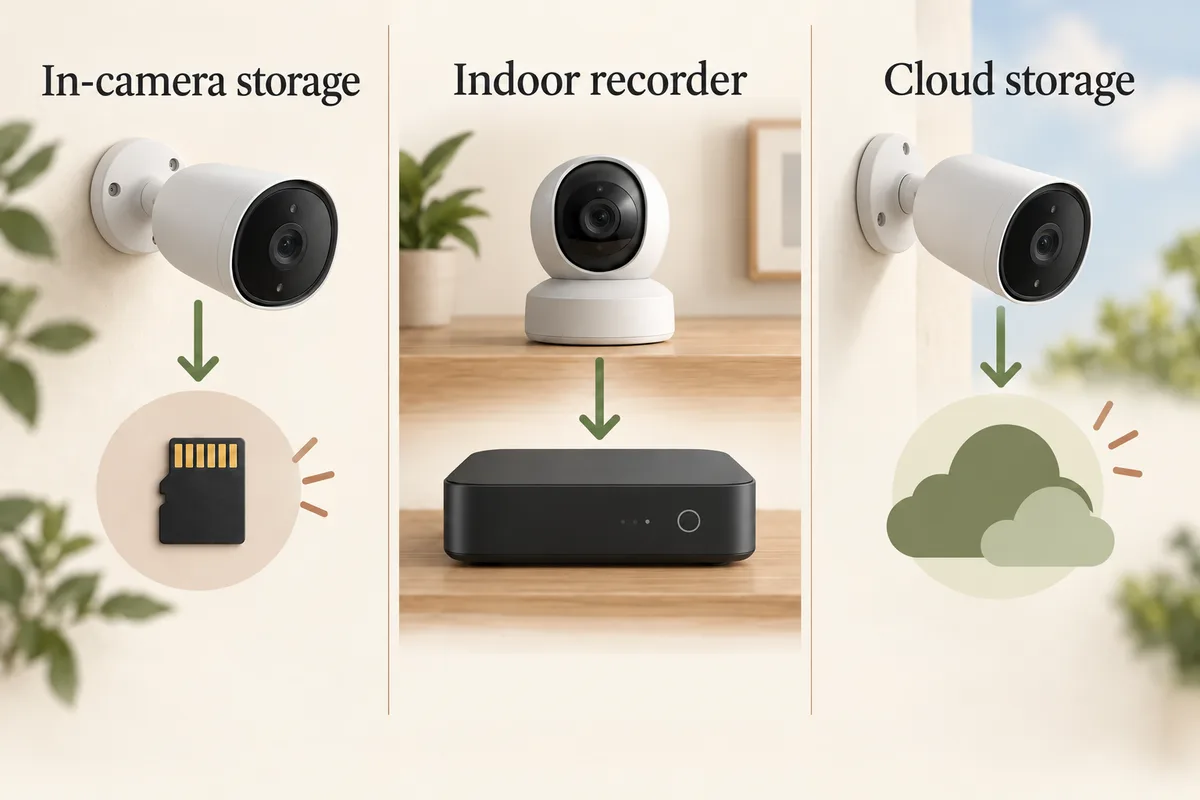
A listed storage capacity does not mean a card or drive is in the box. Check the exact package. For a front entrance, compare video doorbells separately; a doorbell's storage requirements can differ from that brand's outdoor camera.
Decide where the footage should live
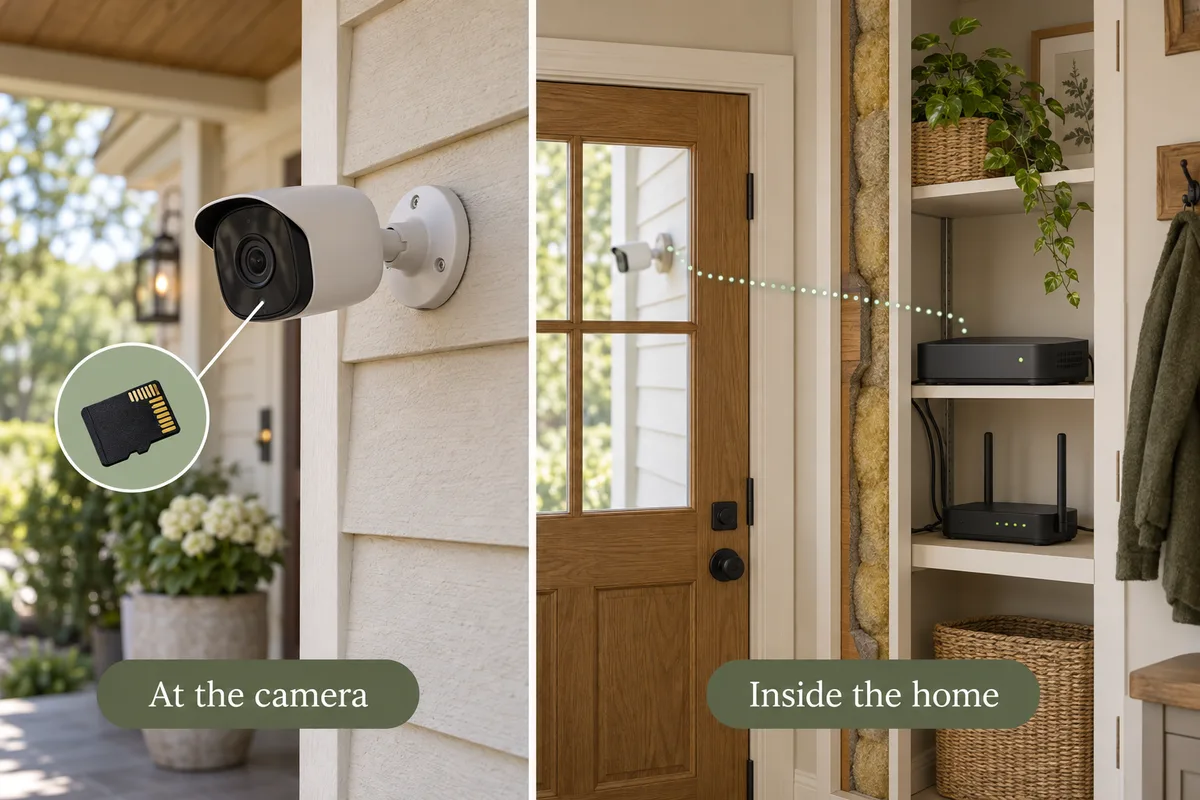
At the camera: built-in storage or a memory card can avoid buying a separate recorder. Think about what happens if the device is damaged or removed, how you export footage and how you will maintain the card.
Inside your home: a compatible hub or recorder moves the recording destination away from the exposed camera. It adds hardware cost and may have limits on supported models, channels, storage or simultaneous recording. A hub is not automatically compatible just because it uses Wi-Fi.
Continuous recording without a subscription
If you only need clips of a visitor reaching the door, event recording may suit the job. If you need to reconstruct activity before a trigger or follow a scene over a long period, inspect the continuous-recording options instead.
Do not infer this from “solar,” “wireless” or “no monthly fee.” Those labels answer different questions. Recording mode also affects storage use and power requirements. Confirm the supported mode and retention settings for your chosen camera, not a similar-looking model.
Wyze Cam v4 is one documented plug-in example: its manufacturer page lists continuous local microSD recording without a subscription. Check the compatible card and outdoor power arrangement. The storage mode still needs to be enabled; a card in the slot alone is not an installation test.
For an entrance, the no-subscription doorbell guide compares specific wired-mode requirements. For the wider system, compare power and network options before assuming a battery, solar or PoE label establishes continuous recording.
- Find an explicit continuous-recording specification for the exact model and power mode.
- Confirm the supported card, hub or recorder and whether it is included.
- Enable a continuous schedule and check footage from a time with no motion event.
- Check how storage loops, how clips are exported and what happens if the network fails.
- Verify playback after any cloud trial ends.
Compare a complete three-year setup
Use a transparent comparison: camera hardware + required storage and hubs + installation equipment + 36 months of the chosen service. Taxes, changing prices, internet service, electricity and future replacement parts may be outside a simple estimate.
For a no-subscription setup, the paid recording-plan line can be zero while the required hardware line is larger. For a cloud setup, a lower camera price may be offset by recurring fees. If you already own compatible equipment, identify the exact model before assuming you can reuse it.
Choose the layout before the bundle
A four-camera kit is not useful if only two of its cameras can be installed where you need them. Start with the number of separate views, check where to put them, then use the no-subscription planner starting point to compare devices.
The preset turns on the recording preference; it does not preselect a universally compatible kit. Keep reviewing power, mounts, storage and local availability as you add products. Canadian shoppers should use the regional store view for recorded CAD offers rather than converting a US price.
Related questions
Does no subscription mean no extra costs?
No. A memory card, compatible hub, hard drive, mount, power supply or installer may still be needed. Compare the complete setup rather than the camera price alone.
Should I replace cameras I already own to avoid a subscription?
Compare the future cost of keeping them with the future cost of replacement. Existing camera purchase prices are sunk costs; compatible storage, installation and continuing services still matter. Model only the devices actually being replaced, and confirm the recording functions you need before cancelling a plan.
Can wireless outdoor cameras record without a subscription?
Some can. Check the exact model's local storage and whether you need a hub or memory card. Wireless describes the connection or power arrangement; it does not tell you whether recording is free.
Can a camera record continuously without a subscription?
Some wired systems support continuous local recording. Do not assume a battery camera with free storage records all day. Verify the model, power mode, storage capacity and recording settings.
Do I lose all functions when I cancel a camera plan?
That depends on the model and service. Live view, saved clips, detection features and alerts may have different requirements. Check the manufacturer's free-versus-paid feature list before cancelling.
Will local recording work if the internet goes down?
The reviewed Tapo C120 and Reolink camera-card routes can keep configured local recording while powered. App playback needs the home network; remote camera access and new push alerts need internet. Other models, recording modes and power-loss behavior require separate evidence.
Is local storage private by default?
It changes where footage is stored, but privacy also depends on accounts, permissions, firmware and network configuration. Do not treat a local-storage label as a complete privacy guarantee.
MAKE IT FIT YOUR HOME
Choose your next step
Use the conditions from this guide as a starting point. Your current list stays in place while you compare.
CHOOSE DEVICES
Cameras without a paid recording plan
Choose your camera quantity, then compare local-recording setups. Power stays undecided until you choose it.
Compare in My list → Plan positions firstCHOOSE DEVICES
One doorbell, no recording subscription
Compare one doorbell with local recording. Choose battery or wired power to match your entrance.
Compare in My list → Plan positions firstChoose a bundle or individual devices, then add them to My list for compatibility checks and store links. A selected quantity is not a guarantee of coverage.
Sources & checks
- eufy SoloCam S340: product and storage specifications
- CCTV Camera World: local recording and recorder tradeoffs
- Ring: current recording plans and included features
- How our catalog and three-year cost estimates work
Guide checked 2026-09-29. Product prices and specifications have their own checked dates on each model page.